
If your Wi-Fi keeps dropping during online gaming, struggles when several family members stream videos, or barely reaches the bedroom, upgrading your router could be worth considering. The good news is that you don’t necessarily need to spend ₹10,000 to improve your home network.
The best Wi-Fi 6 router under ₹5000 in India can offer dual-band connectivity, Gigabit Ethernet ports, improved support for multiple connected devices, and modern security features. Models from TP-Link and D-Link are particularly worth comparing in this budget.
But there’s an important catch: buying a faster router won’t automatically increase the speed of your broadband plan or eliminate every gaming-lag problem. Your internet connection, home layout, connected devices, and router placement all influence the result.
We’ve shortlisted four Wi-Fi 6 routers worth considering for Indian homes, including budget options and a higher-specification upgrade. We’ve also explained which features actually matter so you can avoid paying for specifications you may never use.
Quick verdict: The D-Link R15 is worth considering if you want an affordable Wi-Fi 6 upgrade. The TP-Link Archer AX12 is a good all-round budget option, while the Archer AX10 offers additional processing capability. If you find the TP-Link Archer AX23 within ₹5,000 from a reliable seller, its AX1800 specification and four Gigabit LAN ports make it an attractive upgrade.
Affiliate disclosure: Cosmic Gadgets may earn a commission from qualifying purchases made through links in this article, at no additional cost to you. Our recommendations are based on published specifications and available retailer listings, not independent laboratory testing of all four routers.
Best Wi-Fi 6 Routers Under ₹5,000: Quick Comparison
| Router | Best for | Wi-Fi class | Gigabit LAN ports | Indicative online price |
|---|---|---|---|---|
| D-Link R15 | Tight budgets | AX1500 | 3 | Around ₹2,200 |
| TP-Link Archer AX12 | Budget all-round use | AX1500 | 3 | Around ₹3,200–₹3,700 |
| TP-Link Archer AX10 | Gaming and multi-device households | AX1500 | 4 | Around ₹3,500–₹4,400 |
| TP-Link Archer AX23 | Higher wireless capacity | AX1800 | 4 | Around ₹4,500–₹5,500 |
Prices are indicative, based on online listings available during research. Discounts, bank offers, sellers, and delivery locations can change the final price. The Archer AX23, in particular, may exceed ₹5,000 without promotional offers. Verify the current checkout price and warranty before buying. Flipkart
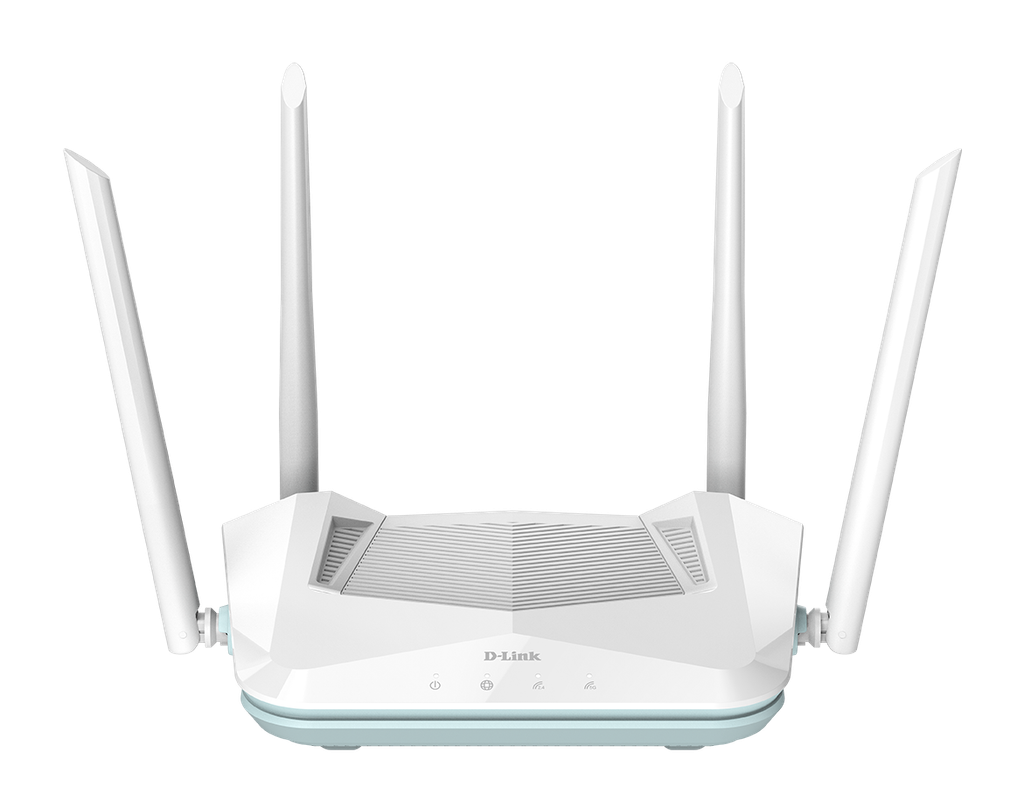
1. D-Link R15 — Best Budget Wi-Fi 6 Router
Create a premium 16:9 landscape featured image for a technology buying guide titled “BEST WI-FI 6 ROUTERS”. Show four sleek modern wireless routers on a clean desk, with external antennas, subtle blue and cyan network signal graphics, a gaming PC in the background, and a modern Indian home-office atmosphere. Use realistic product photography, crisp details, balanced lighting, and a professional technology-publication aesthetic. Add bold, perfectly readable text: “BEST WI-FI 6 ROUTERS” with a smaller subtitle: “UNDER ₹5,000 • INDIA 2026”. Keep the typography large and mobile-friendly. Avoid fake brand logos, exaggerated signal effects, clutter, and unsupported performance claims. High contrast, polished composition, 16:9 horizontal format.
Best for: Smaller households, everyday streaming, browsing, and affordable broadband upgrades.
The D-Link R15 is a sensible starting point if you want to move to Wi-Fi 6 without spending much.
It supports dual-band AX1500 Wi-Fi, with a theoretical wireless rate of up to 1,201 Mbps on 5 GHz and 300 Mbps on 2.4 GHz. It also supports WPA3 security, MU-MIMO, OFDMA, and D-Link’s Eagle Pro AI features for network management and optimisation. D-Link
Key specifications
| Feature | Specification |
|---|---|
| Wi-Fi standard | Wi-Fi 6 |
| Wireless class | AX1500 |
| 5GHz theoretical rate | Up to 1,201 Mbps |
| 2.4GHz theoretical rate | Up to 300 Mbps |
| Ethernet ports | 1 Gigabit WAN + 3 Gigabit LAN |
| Security | WPA2/WPA3 support |
| Additional features | OFDMA, MU-MIMO, AI network optimisation |
| Indicative price | Around ₹2,200 |
Source: D-Link R15 official product specifications.
Why consider the D-Link R15?
The main attraction is its price. You get Wi-Fi 6, Gigabit Ethernet connectivity, and modern wireless security without spending your entire budget.
Its three Gigabit LAN ports are useful for connecting devices such as a desktop PC, television, or gaming console. Wired connections are particularly worth considering for devices where connection consistency matters.
D-Link also provides network-management features through its Eagle Pro AI ecosystem. These can help manage connected devices and network settings, although software features alone don’t guarantee better real-world performance.
What are the limitations?
The R15 belongs to the AX1500 class, so it isn’t the strongest wireless option in this comparison on paper. It also has three LAN ports rather than four.
Actual coverage depends on your home, walls, interference, and connected devices. Don’t assume the router will cover every room simply because its specifications advertise a particular number of supported devices.
Our verdict: A good budget candidate if the current price is close to ₹2,200 and you don’t need four wired LAN ports.
Call to action: Check the latest price on Amazon India or Flipkart. Insert your affiliate link here.
2. TP-Link Archer AX12 — Best Budget All-Rounder
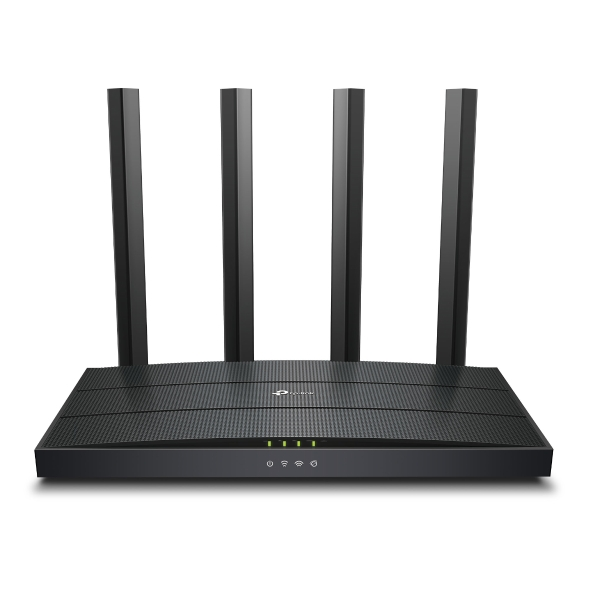
Best for: Homes that need modern Wi-Fi, straightforward setup, and Gigabit broadband connectivity.
The TP-Link Archer AX12 is worth considering if you want a relatively affordable Wi-Fi 6 router for a mixture of smartphones, laptops, televisions, and other connected devices.
Its AX1500 rating combines theoretical rates of up to 1,201 Mbps on 5GHz and 300 Mbps on 2.4GHz. TP-Link also lists OFDMA, MU-MIMO, beamforming, WPA3 security, and three Gigabit LAN ports. TP-Link
Key specifications
| Feature | Specification |
|---|---|
| Wi-Fi standard | Wi-Fi 6 |
| Wireless class | AX1500 |
| 5GHz theoretical rate | Up to 1,201 Mbps |
| 2.4GHz theoretical rate | Up to 300 Mbps |
| Ethernet ports | 1 Gigabit WAN + 3 Gigabit LAN |
| Security | WPA3 support |
| Wireless features | OFDMA, MU-MIMO, beamforming |
| Management | TP-Link Tether app and web interface |
| Indicative price | Around ₹3,200–₹3,700 |
Source: TP-Link Archer AX12 official specifications.
Why consider the Archer AX12?
The AX12 offers a practical combination of features for a typical home.
Wi-Fi 6: The standard introduces technologies designed to improve network efficiency, particularly when multiple compatible devices are communicating.
Gigabit Ethernet: Its wired ports support Gigabit connections, which is useful if your broadband plan and connected devices support those speeds.
WPA3 security: Compatible devices can use modern wireless encryption, helping improve network security.
Easy management: TP-Link’s Tether app provides a convenient way to manage supported router settings from a phone.
The router also supports access-point mode, which can be useful if you already have an ISP-provided router and want the AX12 to provide Wi-Fi rather than act as a second router. Confirm the correct configuration for your existing setup before connecting it. TP-Link
Is it suitable for gaming?
Yes, it can be suitable for everyday online gaming, particularly if your broadband connection is reliable.
However, Wi-Fi 6 does not guarantee low ping in every game. Server distance, congestion, your ISP’s routing, and wireless interference can still affect latency.
If you’re building a dedicated gaming setup, connecting your PC or console through Ethernet is usually the better starting point.
Our verdict: Consider the Archer AX12 if you want a straightforward Wi-Fi 6 upgrade and find it at a competitive price from a reputable seller.
Call to action: Check the latest price on Amazon India or Flipkart. Insert your affiliate link here.
3. TP-Link Archer AX10 — Best for Wired Gaming and Multiple Devices
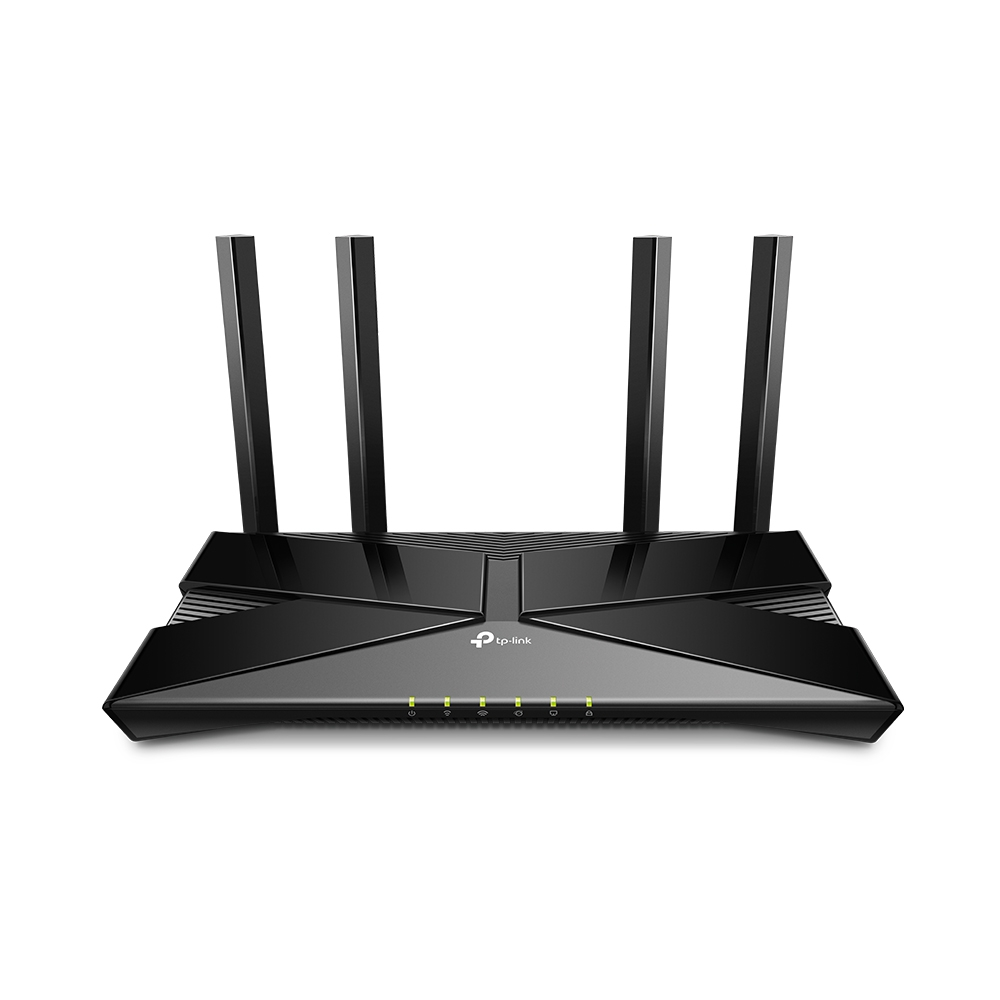
Best for: Users who want four LAN ports and additional router-processing capability.
The TP-Link Archer AX10 is another AX1500 Wi-Fi 6 router, but it has a different hardware configuration from the AX12.
TP-Link lists a 1.5GHz triple-core processor, four external antennas, beamforming, MU-MIMO, and four Gigabit LAN ports alongside its Gigabit WAN port. Its theoretical wireless rates reach 1,201 Mbps on 5GHz and 300 Mbps on 2.4GHz. TP-Link
Key specifications
| Feature | Specification |
|---|---|
| Wi-Fi standard | Wi-Fi 6 |
| Wireless class | AX1500 |
| 5GHz theoretical rate | Up to 1,201 Mbps |
| 2.4GHz theoretical rate | Up to 300 Mbps |
| Processor | 1.5GHz triple-core CPU |
| Ethernet ports | 1 Gigabit WAN + 4 Gigabit LAN |
| Wireless features | MU-MIMO, beamforming |
| Management | TP-Link Tether app |
| Indicative price | Around ₹3,500–₹4,400 |
Source: TP-Link Archer AX10 official specifications.
Why choose the Archer AX10?
The biggest practical advantage is its four Gigabit LAN ports.
Imagine your setup includes:
- A gaming PC
- A PlayStation or Xbox
- A smart TV
- A desktop or another wired device
Four LAN ports give you more flexibility before you need to buy an additional network switch.
The triple-core processor is another specification worth noting, although it shouldn’t be treated as proof that the AX10 will always outperform the AX12. Real-world performance also depends on firmware, wireless conditions, connected devices, and network load.
Should you buy it instead of the AX12?
Compare the prices before deciding.
If the AX10 costs only slightly more and you need the extra wired port, it may be the better fit. If the AX12 is substantially cheaper and three LAN ports are sufficient, the more affordable router could be the smarter purchase.
Don’t buy the AX10 simply because it has a faster-sounding processor specification. Choose it for the complete feature set you will actually use.
Our verdict: A worthwhile option for a wired gaming setup or a home with several devices that benefit from Ethernet connections.
Call to action: Check the latest price on Amazon India or Flipkart. Insert your affiliate link here.
4. TP-Link Archer AX23 — Best Upgrade If You Find It Under ₹5,000
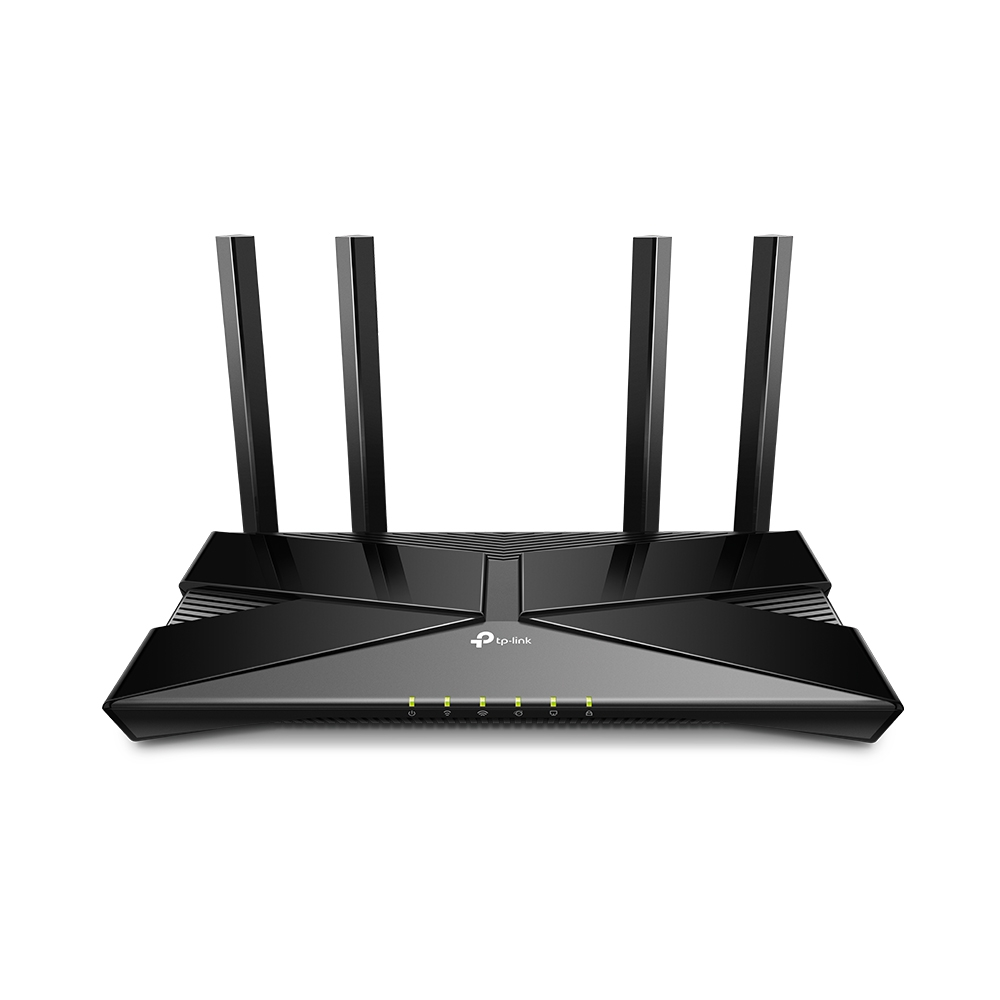
Best for: Households with several compatible devices and buyers who want a higher-specification Wi-Fi 6 router.
The TP-Link Archer AX23 is the most interesting upgrade in this shortlist if you can find it within your budget.
It belongs to the AX1800 class, with theoretical rates of up to 1,201 Mbps on 5GHz and 574 Mbps on 2.4GHz. TP-Link also lists four Gigabit LAN ports, OFDMA, beamforming, WPA3 security, and mesh-related capabilities. TP-Link
Key specifications
| Feature | Specification |
|---|---|
| Wi-Fi standard | Wi-Fi 6 |
| Wireless class | AX1800 |
| 5GHz theoretical rate | Up to 1,201 Mbps |
| 2.4GHz theoretical rate | Up to 574 Mbps |
| Ethernet ports | 1 Gigabit WAN + 4 Gigabit LAN |
| Wireless features | OFDMA, beamforming |
| Security | WPA3 support |
| Mesh features | OneMesh and compatible EasyMesh support |
| Indicative price | Around ₹4,500–₹5,500, depending on offers |
Source: TP-Link Archer AX23 official specifications.
Why is AX1800 worth considering?
Compared with AX1500 models, the AX23 has a higher advertised combined wireless rate and a higher theoretical rate on 2.4GHz.
That doesn’t mean every device will become faster. Wireless speeds depend on the capabilities of the connected device, signal quality, channel conditions, and other factors.
However, the AX23 is worth comparing if your home has multiple compatible devices and you want a higher-specification router.
Its four Gigabit LAN ports are also convenient for users who prefer wired connections for gaming and entertainment devices.
What about mesh networking?
The AX23 supports compatible mesh options, which can help you expand coverage when used with suitable devices.
Mesh networking can be useful in homes where one router cannot reliably cover every room. But compatibility depends on the devices and their supported features, so check the manufacturer’s compatibility information before purchasing an additional node.
If the AX23 is priced above ₹5,000, compare it with the AX10 rather than assuming the more expensive router is automatically better value.
Our verdict: The upgrade to target during a good deal. If it falls below ₹5,000 from a reputable seller, compare it closely with the AX10 before making your final choice.
Call to action: Check the latest price on Amazon India or Flipkart. Insert your affiliate link here.
Which Router Should You Buy?
Here’s the short version based on your needs.
| Your priority | Router to consider |
|---|---|
| Lowest purchase cost | D-Link R15 |
| Affordable Wi-Fi 6 for everyday use | TP-Link Archer AX12 |
| Four Gigabit LAN ports at a budget-friendly price | TP-Link Archer AX10 |
| Higher advertised wireless capacity | TP-Link Archer AX23 |
| Wired PC or console gaming | Any of these, provided the router meets your needs; use Ethernet where possible |
These are recommendations based on specifications, features, and observed prices—not controlled head-to-head performance tests.
How to Choose a Wi-Fi 6 Router in India
Before buying, it helps to understand which specifications matter and which ones are easy to misinterpret.
1. What does AX1500 or AX1800 mean?
The AX number identifies a wireless performance class, not the speed you will necessarily see on your phone or laptop.
For example, an AX1500 router can advertise a combined theoretical rate of 1,500 Mbps across its wireless bands. That figure does not mean a single device will download files at 1,500 Mbps.
Your actual speed depends on the device, signal strength, channel width, interference, router configuration, and broadband connection.
Buying tip: Treat the AX rating as a way to compare broad product classes, not as a promise of real-world internet speed.
2. Is Wi-Fi 6 better than Wi-Fi 5?
Wi-Fi 6, also known as 802.11ax, introduces improvements intended to make wireless networks more efficient, especially when several compatible devices share the network.
Features such as OFDMA and MU-MIMO help manage communication with multiple devices. Wi-Fi 6 also supports modern security options such as WPA3 when implemented and enabled appropriately. TP-Link
For a new router purchase, Wi-Fi 6 is worth considering if the price difference from a comparable older router is small.
However, a well-positioned Wi-Fi 5 router can still provide a satisfactory experience. An upgrade is not automatically necessary if your existing network already meets your needs.
3. Are Gigabit Ethernet ports important?
Yes, particularly if you have a fast broadband plan or want wired connections for gaming and streaming.
A Gigabit Ethernet port supports a link rate of up to 1,000 Mbps under suitable conditions. The actual internet speed will still be limited by your broadband plan and other network equipment.
Before buying, count the devices you want to connect by cable. If you need four wired devices, a router with only three LAN ports may require an additional switch.
4. Is a Wi-Fi 6 router good for online gaming?
It can be, but a new router cannot solve every cause of lag.
Online gaming performance depends on several factors:
- Your ISP’s connection and routing
- Distance to the game server
- Network congestion
- Wireless interference
- Other devices downloading or streaming
- The game’s own server performance
For the most consistent connection, use Ethernet between your gaming PC or console and the router whenever possible.
If Ethernet isn’t practical, connect over the 5GHz band when the signal is strong. If you experience unstable performance in a distant room, investigate signal coverage before buying a more expensive router.
5. Should you buy a router with more antennas?
Not necessarily.
External antennas can help a router direct and receive wireless signals, but antenna count alone doesn’t tell you how well a router will perform in your home.
Placement, antenna design, building materials, neighbouring Wi-Fi networks, and the receiving device all matter.
A well-positioned router may perform better for your home than a router with more antennas placed behind a television or inside a cabinet.
6. What about Wi-Fi 6E and Wi-Fi 7?
Wi-Fi 6E adds access to the 6GHz band in supported regions and devices, while Wi-Fi 7 introduces additional capabilities.
However, these technologies are not necessary for every household.
If your budget is ₹5,000, focus on getting a dependable Wi-Fi 6 router with Gigabit ports and features that match your needs. Consider a newer wireless standard only if the price, your devices, and your network requirements justify the extra spending.
7. Will a new router work with JioFiber, Airtel Xstream Fiber, or BSNL?
It depends on how your broadband connection is configured.
Many home networks can use an additional router behind the ISP-provided equipment, but the setup differs between router mode, access-point mode, and bridge mode.
Before buying, check:
- Whether your ISP device has a usable Ethernet LAN port
- Whether you want the new device to manage routing or only provide Wi-Fi
- Whether your ISP requires particular authentication or VLAN settings
- Whether you need to retain the ISP device for telephone or television services
If you connect one router behind another while both perform routing, you can create a double-NAT setup. This may complicate some gaming, port-forwarding, or remote-access configurations.
If you only need better Wi-Fi coverage, access-point mode may be the simpler option. Check the documentation for your router and ISP before changing settings.
How to Improve Your Wi-Fi Without Buying a New Router
Before spending ₹3,000–₹5,000, try these practical steps.
Move the router to a better position
Place it in an open, central location when possible. Avoid hiding it inside a cabinet or placing it directly behind large objects.
Use the right Wi-Fi band
The 5GHz band can offer higher throughput over shorter distances, while 2.4GHz may provide better reach in some environments. Neither band guarantees better performance in every room.
Connect gaming devices by Ethernet
A wired connection removes the wireless link between your device and the router, which can improve consistency.
Check for congestion
If performance drops when several people use the internet, check whether the router or broadband connection is becoming overloaded. A faster router may help with local wireless efficiency, but it cannot increase the capacity of your ISP’s plan.
Update the router’s firmware
Install appropriate firmware updates from the manufacturer’s official support page. Updates can include security fixes and stability improvements.
If these steps solve the problem, you may not need to buy a new router at all.
Frequently Asked Questions
Which is the best Wi-Fi 6 router under ₹5,000 in India?
The TP-Link Archer AX12 and Archer AX10 are good models to compare for budget Wi-Fi 6 networking. The D-Link R15 is worth considering if you want to spend less. If the Archer AX23 falls below ₹5,000, it is an attractive higher-specification alternative.
Is the TP-Link Archer AX12 good for gaming?
It can be suitable for everyday online gaming. For the most consistent experience, connect your gaming PC or console through Ethernet when possible. Wi-Fi 6 does not guarantee a particular ping or eliminate server-related lag.
Is the D-Link R15 worth buying?
It is worth considering if you find it at a competitive price and need a basic dual-band Wi-Fi 6 router with Gigabit Ethernet. Check the warranty and seller carefully before ordering.
Should I choose the Archer AX10 or AX12?
Choose the AX10 if you need four Gigabit LAN ports or prefer its hardware configuration. The AX12 has three Gigabit LAN ports and may be better value if it is significantly cheaper and meets your requirements.
Is the Archer AX23 worth buying under ₹5,000?
It is worth comparing at that price because it belongs to the AX1800 class and has four Gigabit LAN ports. Make sure the final price, warranty, and exact model are correct before ordering.
Can a Wi-Fi 6 router increase my internet speed?
It can improve the wireless connection between compatible devices and your home network, but it cannot automatically increase the speed of your broadband plan. Real-world performance depends on your ISP, devices, signal conditions, and network configuration.
How many devices can a Wi-Fi 6 router handle?
There is no single number that guarantees good performance. A router may advertise support for many devices, but the experience depends on how many are actively transferring data, their capabilities, and the router’s hardware.
Do I need a mesh Wi-Fi system instead of a router?
If you have a small home and one router provides adequate coverage, a single router may be sufficient. If you have persistent dead zones across multiple rooms or floors, a compatible mesh system or a properly configured access point may be a better solution.
Final Verdict: Which Wi-Fi 6 Router Is Worth Your Money?
You don’t need to spend your entire ₹5,000 budget to get a capable Wi-Fi 6 router.
The D-Link R15 is worth considering if you want an inexpensive upgrade. The TP-Link Archer AX12 offers a practical feature set for everyday use, while the Archer AX10 is a useful alternative if you need four wired LAN ports.
If you find the TP-Link Archer AX23 below ₹5,000, compare it closely with the AX10. Its AX1800 wireless class makes it an attractive option, but don’t pay extra unless its features justify the difference for your home.
Our recommendation: Start by comparing the D-Link R15 and TP-Link Archer AX12. If you need more wired ports, look at the AX10. If the AX23 is available at a genuine discount, consider it as the upgrade option.
Before checking out, confirm the current price, seller, warranty, and compatibility with your broadband setup. The best router is the one that solves your actual networking problem—not simply the one with the biggest number on its box.