
A good gaming mouse can make a noticeable difference to your gaming experience. Whether you play Valorant, Counter-Strike 2, GTA V, BGMI on PC or story-driven games, having a comfortable mouse with accurate tracking makes everyday gameplay more enjoyable.
The good news is that you don’t need to spend ₹5,000 or ₹10,000 to get a decent gaming mouse.
In the Indian market, brands such as Logitech, Razer, HyperX and Redragon offer gaming mice with programmable buttons, adjustable DPI, RGB lighting and dedicated gaming sensors in or around the ₹2,000 price bracket.
But which one should you actually buy?
Some mice prioritise comfort, others offer additional programmable buttons, while lightweight models are better suited to fast-paced FPS games.
In this guide, we compare five gaming mice worth considering under ₹2,000 in India and explain which one makes the most sense for different types of gamers.
Affiliate disclosure: This article may contain affiliate links. Cosmic Gadgets may earn a commission if you purchase through qualifying links, at no additional cost to you. Our recommendations are based on product specifications, market research and value considerations, not paid rankings or hands-on testing.
Quick Comparison: Best Gaming Mice Under ₹2,000
| Gaming mouse | Indicative price | Maximum DPI | Best for |
|---|---|---|---|
| Logitech G102 LIGHTSYNC | ₹1,499 | 8,000 | Best overall |
| Razer DeathAdder Essential | ₹1,119 | 6,400 | Palm grip |
| HyperX Pulsefire Core | ₹1,751 | 6,200 | Balanced features |
| Redragon M612 Predator | ₹950–₹1,150 | 8,000 | Extra buttons |
| Corsair Katar PRO XT | Check current price | 18,000 | Lightweight FPS gaming |
Prices are indicative of retailer listings and may change. The Corsair is included as a stretch alternative only if you find it discounted below ₹2,000. Check the final checkout price and warranty before buying.
1. Logitech G102 LIGHTSYNC – Best Overall Gaming Mouse
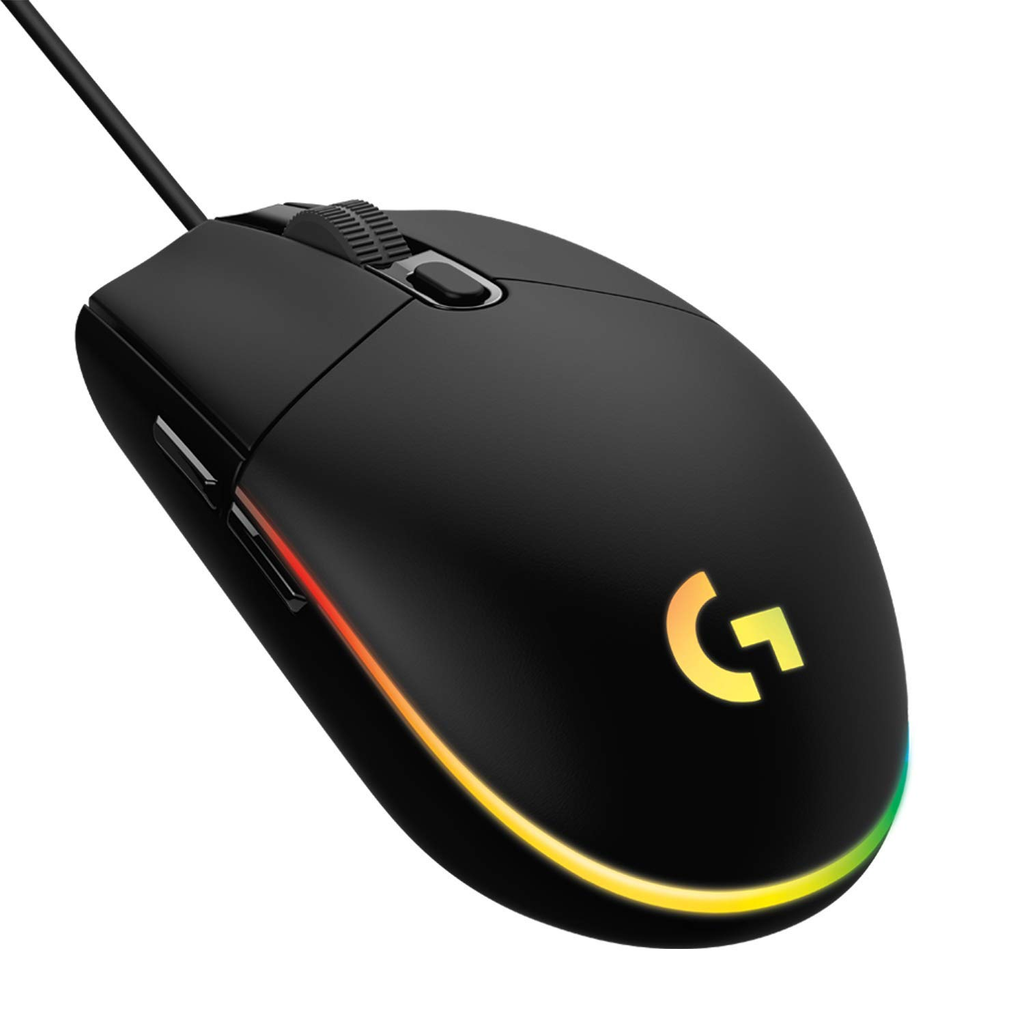
The Logitech G102 LIGHTSYNC is one of the most recognisable budget gaming mice available in India.
It follows a simple formula: a compact symmetrical design, a gaming-grade optical sensor, six programmable buttons and customisable RGB lighting.
For someone purchasing their first dedicated gaming mouse, the G102 is a sensible starting point.
Key specifications
| Specification | Details |
|---|---|
| Sensor | Logitech gaming-grade optical |
| Maximum DPI | 8,000 |
| Weight | 85g |
| Buttons | 6 programmable |
| Polling rate | Up to 1,000Hz |
| Connectivity | Wired USB |
| Lighting | LIGHTSYNC RGB |
| Warranty | Check the applicable India warranty |
What makes it worth considering?
The G102 offers adjustable sensitivity between 200 and 8,000 DPI.
You can customise DPI settings, lighting and button assignments through Logitech G HUB.
Its 85 g weight makes it reasonably easy to move during gaming sessions.
The symmetrical shape is versatile, although its compact size may not suit everyone, especially users with larger hands who prefer a full palm grip.
Pros
- Reliable and familiar gaming-mouse design.
- 8,000 DPI adjustable sensitivity.
- Six programmable buttons.
- Customisable LIGHTSYNC RGB.
- Lightweight 85 g construction.
Cons
- Wired connectivity only.
- A compact body may feel small for larger hands.
- No dedicated wireless mode.
Our verdict: The Logitech G102 is a strong all-round option for gamers who want a familiar design, useful software and straightforward gaming performance.
Suggested affiliate anchor: Check the Logitech G102 price on Amazon India.
2. Razer DeathAdder Essential – Best for Palm-Grip Users
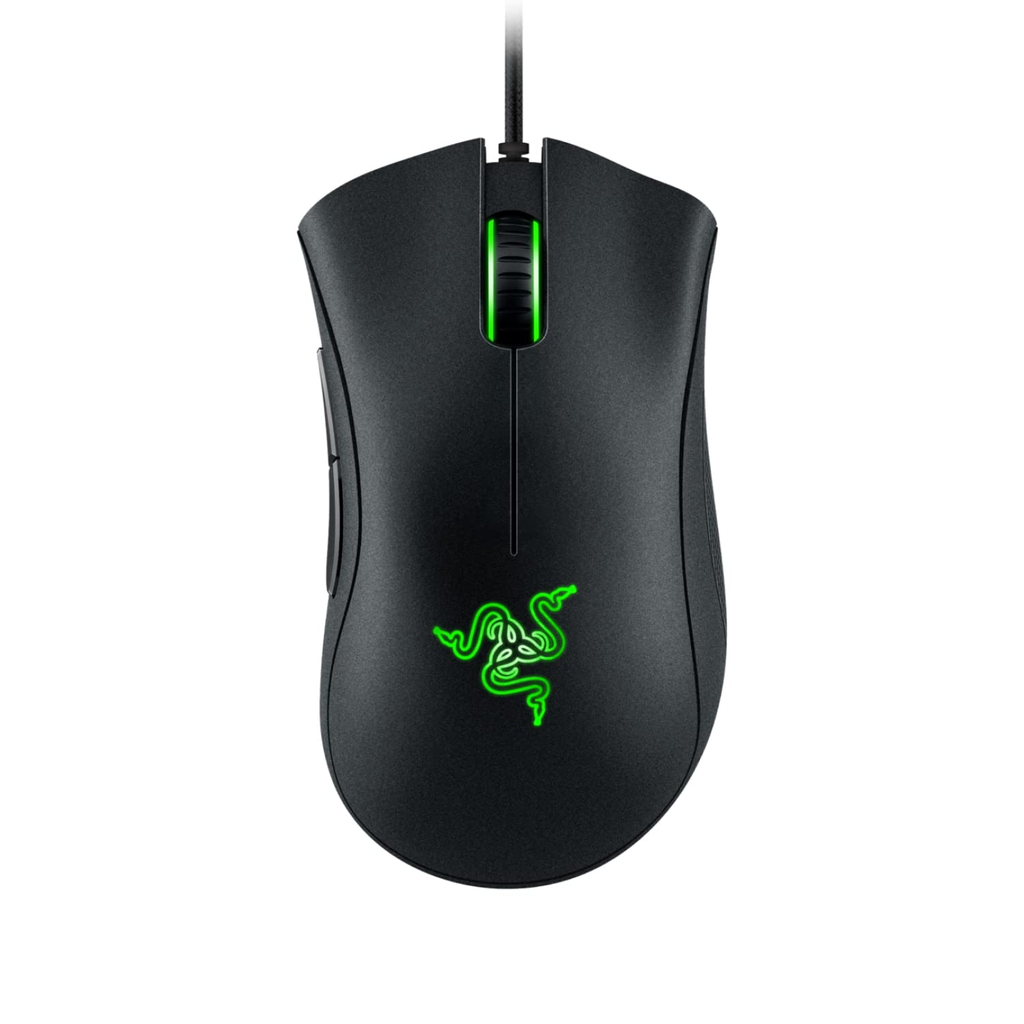
If comfort is your priority, the Razer DeathAdder Essential deserves serious consideration.
Unlike the symmetrical Logitech G102, the DeathAdder Essential uses an ergonomic right-handed design.
Its curved body is intended to support a more natural hand position, particularly for people who prefer palm grip.
Key specifications
| Specification | Details |
|---|---|
| Sensor | Optical |
| Maximum DPI | 6,400 |
| Buttons | 5 programmable |
| Connectivity | Wired USB |
| Shape | Right-handed ergonomic |
| Lighting | Single-colour lighting |
Why should you consider it?
The most important advantage of the DeathAdder Essential is its shape.
If you use a palm grip, your hand rests more naturally over the body compared with many compact symmetrical mice.
Razer advertises a 6,400 DPI optical sensor and five HyperResponse buttons.
For everyday gaming, that is sufficient for most players.
However, the mouse is not particularly lightweight, and left-handed gamers should look elsewhere.
Pros
- Comfortable ergonomic shape.
- 6,400 DPI optical sensor.
- Five programmable buttons.
- Established Razer software ecosystem.
Cons
- Designed for right-handed users.
- Wired-only connectivity.
- Fewer programmable buttons than some alternatives.
- Less suitable for gamers who prefer very lightweight mice.
Our verdict: Choose the DeathAdder Essential if you have medium-to-large hands and prefer palm grip over a compact symmetrical design.
Suggested affiliate anchor: Buy the Razer DeathAdder Essential.
3. HyperX Pulsefire Core – Best Balanced Gaming Mouse
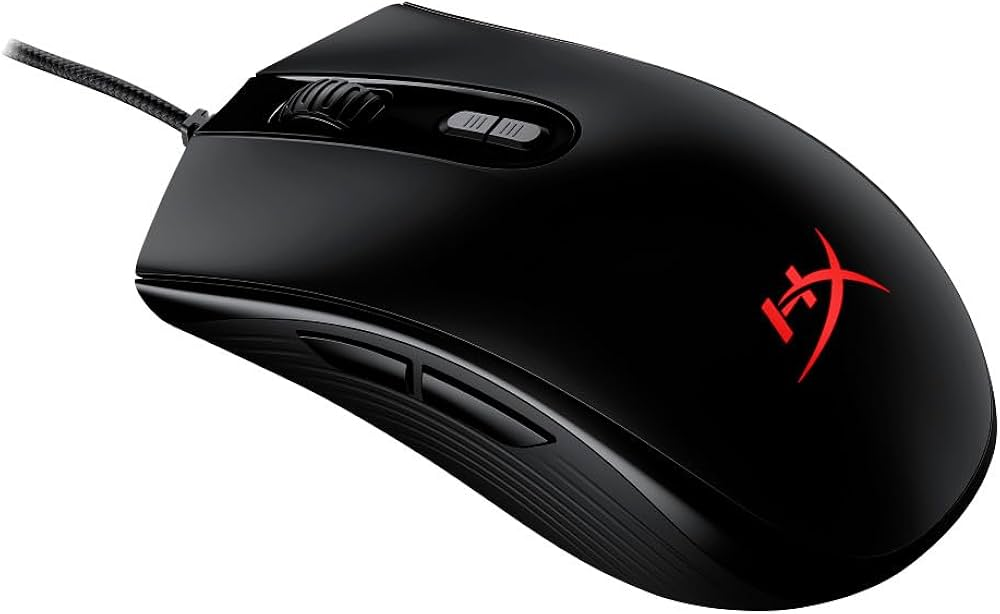
The HyperX Pulsefire Core is another interesting option in the budget gaming category.
It uses a PixArt PAW3327 optical sensor and offers seven programmable buttons.
Unlike mice that focus mainly on RGB lighting, the Pulsefire Core puts more emphasis on its sensor specifications and practical customisation.
Key specifications
| Specification | Details |
|---|---|
| Sensor | PixArt PAW3327 |
| Maximum DPI | 6,200 |
| Weight | 87g |
| Buttons | 7 programmable |
| Polling rate | 1,000Hz |
| Connectivity | Wired USB |
| Lighting | RGB |
| Switch rating | Up to 20 million clicks |
What makes it interesting?
The Pulsefire Core has a symmetrical shape with textured side grips.
It supports both palm and claw grip styles.
Its seven programmable buttons can be customised through HyperX NGENUITY software.
The sensor supports up to 6,200 DPI, 220 IPS tracking speed and 30G acceleration.
It also has a braided cable, which is a useful feature for everyday desk use.
Pros
- PixArt PAW3327 sensor.
- Seven programmable buttons.
- 1,000Hz polling rate.
- Braided cable.
- Customisable RGB lighting.
Cons
- Older product design.
- Wired-only connectivity.
- Availability and pricing can vary significantly between retailers.
Our verdict: The HyperX Pulsefire Core is worth considering if you want additional programmable buttons and a balanced sensor specification. Buy it only when its price is competitive with newer alternatives.
Suggested affiliate anchor: Check the HyperX Pulsefire Core price.
4. Redragon M612 Predator – Best for Extra Programmable Buttons
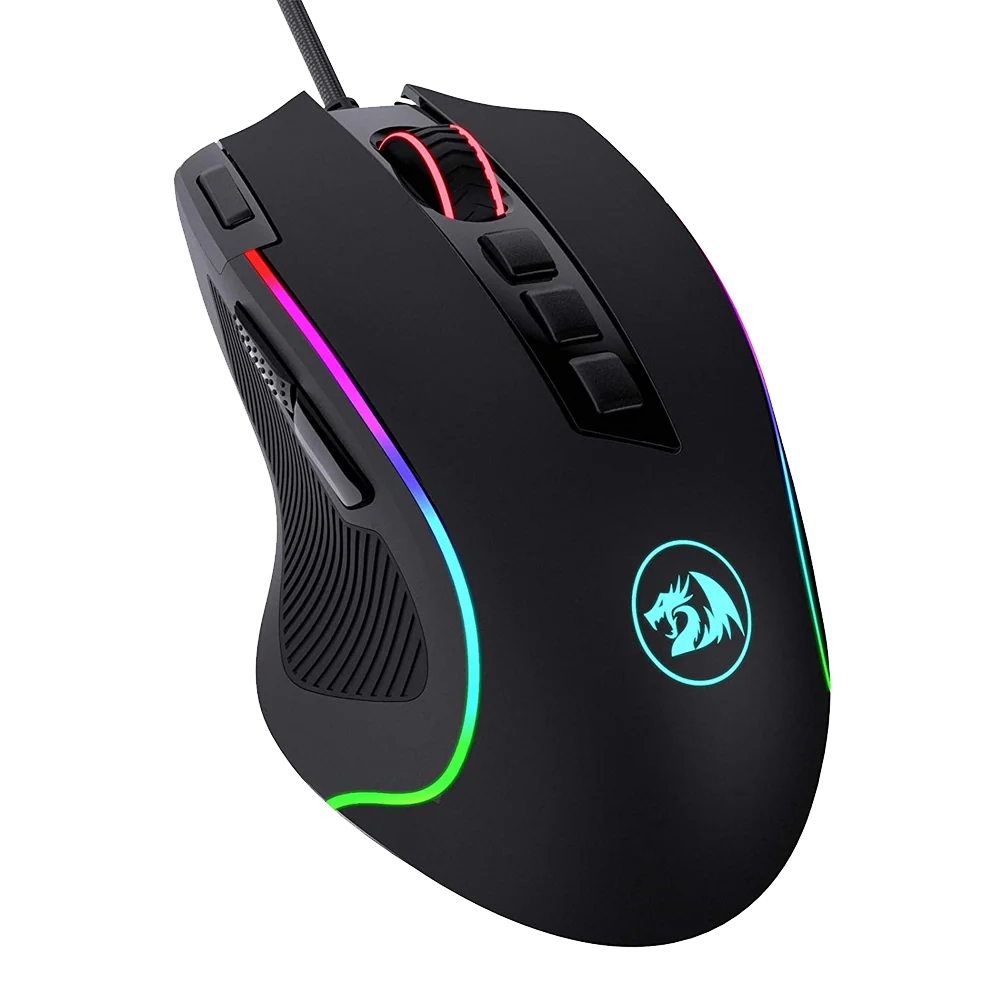
The Redragon M612 Predator is aimed at gamers who want more controls without spending too much.
Its main attraction is its additional programmable buttons.
This can be useful for games where you frequently use shortcuts, abilities, macros and additional commands.
Key specifications
| Specification | Details |
|---|---|
| Maximum DPI | Up to 8,000 |
| Buttons | Up to 11 programmable |
| Connectivity | Wired USB |
| Lighting | RGB |
| Shape | Ergonomic right-handed |
Why buy the M612?
The M612 offers considerably more button customisation than a conventional five-button gaming mouse.
You can assign additional commands and macros using compatible Redragon software.
For MMO and MOBA games, these extra controls can be useful.
However, the additional buttons are not necessarily an advantage for everyone.
FPS players who primarily use left click, right click and a couple of side buttons may prefer a simpler mouse.
Also, the standard M612 and M612 PRO are different variants. Check the exact model before purchasing rather than assuming their connectivity and specifications are identical.
Pros
- Numerous programmable buttons.
- Adjustable DPI.
- RGB lighting.
- Interesting value proposition.
Cons
- More complicated layout for some users.
- Ergonomic shape is not ideal for everyone.
- Exact specifications differ between variants.
Our verdict: Consider the M612 if you play games that benefit from additional shortcuts and macros. It is less compelling if you mainly play competitive FPS titles.
Suggested affiliate anchor: Explore Redragon M612 Predator.
5. Corsair Katar PRO XT – Lightweight Alternative
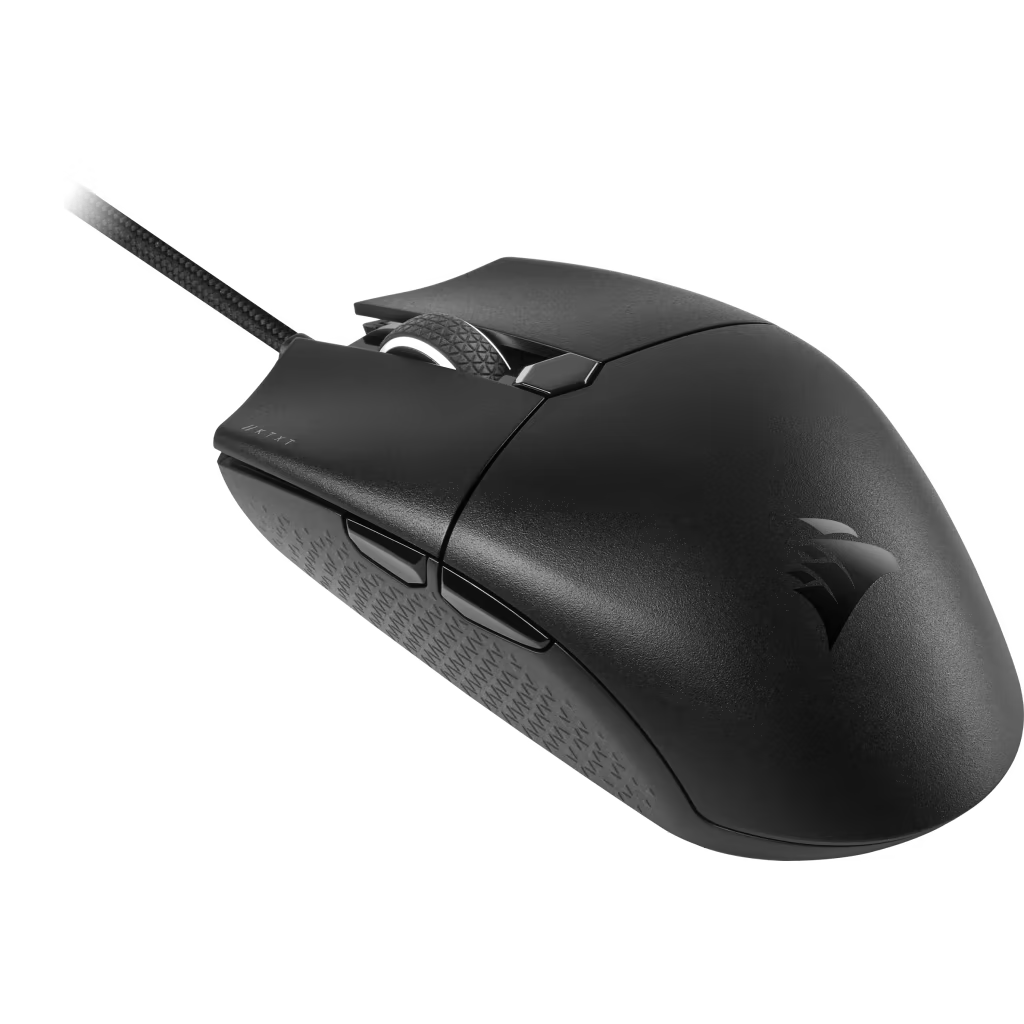
The Corsair Katar PRO XT is a stretch-budget alternative worth keeping on your shortlist if you find a genuine discount.
It is particularly interesting for players who prefer lighter gaming mice.
Key specifications
| Specification | Details |
|---|---|
| Sensor | Optical |
| Maximum DPI | 18,000 |
| Weight | 73g |
| Buttons | 6 programmable |
| Connectivity | Wired USB |
| Software | Corsair iCUE |
Why consider it?
The Katar PRO XT weighs just 73 g.
Its compact symmetrical shape is designed for claw and fingertip grip styles.
Corsair also includes a drag-reducing paracord-style cable and QUICKSTRIKE primary buttons.
Its 18,000 DPI sensor provides plenty of adjustment headroom, although most players will never need the maximum sensitivity.
The main limitation is its price in India. It isn’t always available below ₹2,000, so don’t buy it at an inflated price just to get the Corsair name.
Pros
- Lightweight 73g design.
- High-resolution optical sensor.
- Six programmable buttons.
- Compact symmetrical shape.
- Corsair iCUE software support.
Cons
- Often exceeds the ₹2,000 budget.
- Compact design may not suit large hands.
- Wired connectivity.
Our verdict: A good stretch option for gamers who prioritise weight and fast mouse movement, provided you find it within budget.
Suggested affiliate anchor: Check Corsair Katar PRO XT offers.
How to Choose the Right Gaming Mouse
Before purchasing, there are five things you should understand.
1. DPI is not everything.
DPI refers to how far the cursor moves relative to physical mouse movement.
A higher DPI number does not automatically mean a better gaming experience.
Many competitive players use relatively low sensitivity settings, often between 400 and 1,600 DPI.
Sensor tracking quality and consistency matter more than the maximum DPI printed on the box.
2. Weight matters for FPS gaming
If you play Valorant or Counter-Strike 2, mouse weight can influence how quickly you move and reposition your mouse.
Lightweight mice are often preferred for fast flicks and low-sensitivity aiming.
However, some gamers prefer heavier mice because they provide a more substantial feel.
Try different weights if possible.
3. Understand your grip style
There are three common grip styles:
- Palm grip: Your entire palm rests on the mouse.
- Claw grip: Your palm rests on the rear while your fingers are arched.
- Fingertip grip: Only your fingertips control the mouse.
The Razer DeathAdder Essential is suited to right-handed ergonomic palm-grip users, while the Logitech G102 and HyperX Pulsefire Core offer symmetrical shapes.
4. Check polling rate
Polling rate measures how frequently a mouse reports its position to your computer.
A 1,000Hz polling rate means the mouse reports approximately once every millisecond.
For most budget gaming setups, 1,000Hz is more than adequate.
Do not spend extra money simply to chase a very high polling-rate figure.
5. Check the warranty and service
This is particularly important when purchasing gaming peripherals in India.
Check:
- Brand warranty.
- Exact model number.
- Seller reputation.
- Return and replacement conditions.
- Availability of customer support.
A cheaper listing from an unknown seller may not be the best deal.
Which Gaming Mouse Should You Buy?
| Your requirement | Our recommendation |
|---|---|
| Best all-round choice | Logitech G102 |
| Palm-grip comfort | Razer DeathAdder Essential |
| More programmable buttons | Redragon M612 |
| Balanced sensor and features | HyperX Pulsefire Core |
| Lightweight FPS alternative | Corsair Katar PRO XT |
Frequently Asked Questions
Is a ₹1,000 gaming mouse good enough?
Yes. A decent budget gaming mouse can offer accurate optical tracking, adjustable sensitivity and programmable buttons. You do not need an expensive mouse to enjoy most PC games.
Is Logitech G102 good for Valorant?
Yes. Its 1,000Hz polling rate, adjustable DPI and compact design make it a reasonable option for entry-level and casual competitive gaming.
Is a wired gaming mouse better than wireless under ₹2,000?
Generally, wired models offer more predictable connectivity and avoid battery charging. A wireless mouse with a dedicated 2.4GHz gaming receiver can also work well, but check its polling rate and latency rather than assuming all wireless mice perform equally.
How much DPI should I use for gaming?
There is no universal setting. Many players use 800 DPI as a starting point and adjust their in-game sensitivity to suit their preference.
Which mouse is best for large hands?
The Razer DeathAdder Essential is worth trying first because of its ergonomic right-handed shape. However, hand size and grip style matter, so testing the mouse physically is preferable.
Final Verdict
For most buyers, the Logitech G102 LIGHTSYNC remains a sensible starting point in the under-₹2,000 category.
It combines a familiar shape, six programmable buttons, adjustable DPI and customisable lighting.
However, it isn’t the right choice for everybody.
If comfort is your priority, consider the Razer DeathAdder Essential. If you want more programmable buttons, the Redragon M612 is worth considering. The HyperX Pulsefire Core is a good alternative when competitively priced.
Our advice is simple: choose your mouse based on hand size, grip style and the games you play, not just the biggest DPI number.