
You don’t need to spend ₹5,000 or more to upgrade your gaming setup with a mechanical keyboard. In India, the ₹1,500–₹3,000 segment includes compact 60% keyboards, tenkeyless models with dedicated arrow keys, and options with hot-swappable switches.
But here’s the catch: the best mechanical keyboard under ₹3000 in India isn’t necessarily the one with the brightest RGB lighting. Layout, switch feel, typing noise, build quality, and ease of replacement matter much more when you’re using the keyboard every day.
For this guide, we’ve shortlisted four options: the Redragon K617 Fizz, Cosmic Byte Pandora TKL, Redragon Kumara K552, and Kreo Hive 65. They suit different needs, from competitive FPS gaming to everyday typing and customisation.
Our quick verdict: The Redragon K617 Fizz is worth considering for a compact FPS setup. The Cosmic Byte Pandora TKL is a strong budget choice if you want dedicated arrow keys. The Redragon Kumara K552 is worth comparing if you prefer a traditional tenkeyless keyboard, while the Kreo Hive 65 appeals to buyers who want a compact layout and more customisation options.
We’ve prioritised manufacturer specifications and currently listed prices rather than claiming hands-on testing we haven’t performed.
Affiliate disclosure: Cosmic Gadgets may earn a commission from qualifying purchases through affiliate links in this article, at no additional cost to you. Prices and availability can change, so check the exact model, switch variant, and seller before ordering.
Best Mechanical Keyboards Under ₹3,000: Quick Comparison
| Keyboard | Best for | Layout | Switches | Key feature | Indicative price |
|---|---|---|---|---|---|
| Redragon K617 Fizz | Compact FPS gaming | 60%, 61 keys | Linear red | Hot-swappable switches, detachable USB-C | ₹2,190 |
| Cosmic Byte Pandora TKL | Budget all-round gaming | TKL, 87 keys | Red or blue | Compact layout, swappable switches | ₹1,849 |
| Redragon Kumara K552 | Traditional TKL gaming | TKL, 87 keys | Red or blue variants | Metal-and-ABS construction, anti-ghosting | ₹2,290 |
| Kreo Hive 65 | Compact customisation | 65%, 64 keys | Linear variants | Hot-swap support, RGB, compact layout | Approximately ₹2,299–₹2,499 |
Prices are reference prices from manufacturer or retailer listings available during research on 12 October 2026. The Kreo Hive 65’s listed price varies between product comparison pages, so verify the exact variant and current checkout price. Redragon India
1. Redragon K617 Fizz — Best for Compact FPS Gaming
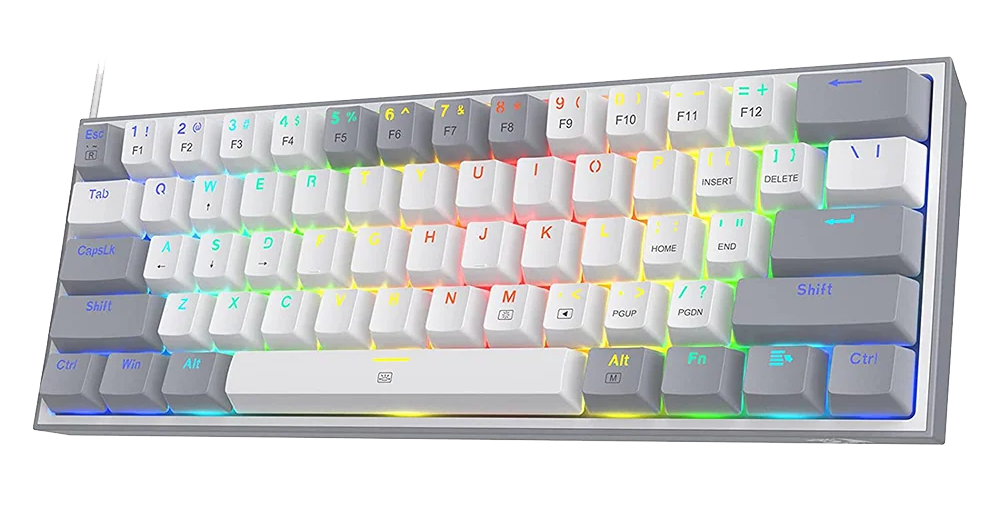
Best for: Valorant, Counter-Strike 2, Apex Legends, and gamers who want more room for mouse movement.
The Redragon K617 Fizz is a 60% mechanical keyboard with 61 keys. It removes the dedicated function row, navigation cluster, and number pad found on larger keyboards, leaving more room for your mouse.
The standard red-switch version is listed at ₹2,190 on Redragon India’s official store. It features a detachable USB-C cable, RGB lighting, hot-swappable switches, and onboard lighting controls. Redragon lists up to 20 preset lighting effects and rates the switches for 50 million keypresses. Redragon India
Key specifications
| Feature | Specification |
|---|---|
| Layout | 60% |
| Number of keys | 61 |
| Switch type | Linear red |
| Connectivity | Wired USB-C |
| RGB lighting | Up to 20 preset effects |
| Hot-swappable | Yes, compatible replacement switches required |
| Key rollover | Full rollover |
| Indicative price | ₹2,190 |
Source: Redragon K617 Fizz official product page.
Why consider the K617 Fizz?
Its compact size is particularly useful for FPS gaming.
If you play at low mouse sensitivity, you may need substantial desk space for wide mouse movements. A smaller keyboard gives you more room without requiring a larger desk.
The linear red switches are another attraction. They move relatively smoothly without the pronounced tactile bump of a tactile switch or the deliberate click of a clicky switch.
The hot-swappable design also gives you flexibility. If a compatible switch develops a problem or you eventually want to experiment with a different feel, you can replace individual switches without soldering.
What are the compromises?
The 60% layout isn’t for everyone.
There are no dedicated arrow keys or function row. Those functions are accessed through key combinations, which can become inconvenient if you frequently use spreadsheets, edit documents, or work with keyboard shortcuts.
Software support can also vary by operating system. Redragon notes limitations for some Mac software functions, so check compatibility if you intend to customise the keyboard outside Windows. Redragon India
Our verdict: A strong choice for gamers who prioritise mouse space and don’t mind learning a compact keyboard layout.
Call to action: Check the latest price of the Redragon K617 Fizz. Insert your Amazon India or authorised retailer affiliate link here.
2. Cosmic Byte Pandora TKL — Best Budget All-Rounder
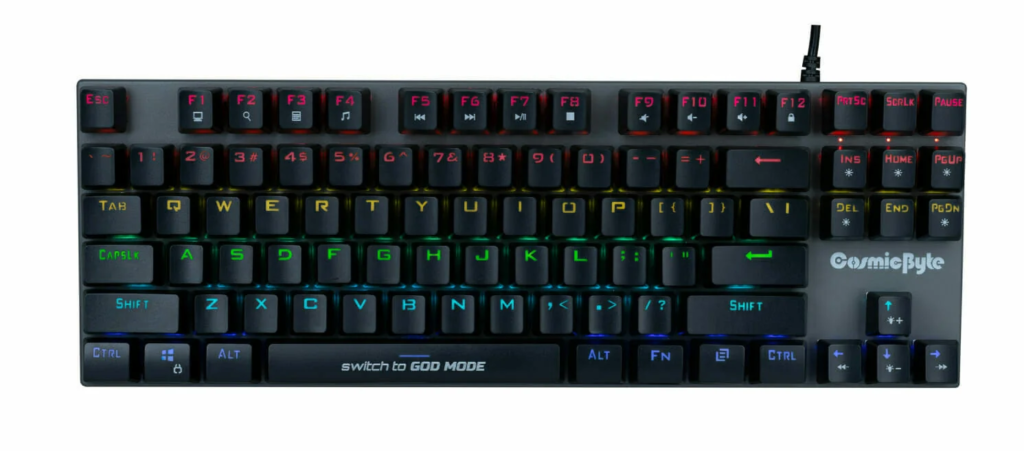
Best for: Gamers and students who want dedicated arrow keys without paying for a full-size keyboard.
The Cosmic Byte Pandora is a tenkeyless mechanical keyboard with 87 keys. It is smaller than a full-size keyboard because it removes the number pad while retaining the dedicated arrow keys and function row.
Cosmic Byte’s official listing offers blue- and red-switch variants. Its documentation specifies Outemu mechanical switches, double-shot keycaps, a metal body, and support for simultaneous key operation without key-ghosting conflicts. Cosmic Byte Store
Key specifications
| Feature | Specification |
|---|---|
| Layout | Tenkeyless (TKL) |
| Number of keys | 87 |
| Switch options | Blue or red |
| Connectivity | Wired USB |
| Keycaps | Double-shot moulded |
| Construction | Metal body, according to manufacturer documentation |
| Lighting | Rainbow backlighting with adjustable effects |
| Switch replacement | Swappable switches |
| Indicative price | ₹1,849 |
Source: Cosmic Byte Pandora TKL official product page and Pandora user manual and specifications.
Why consider the Pandora TKL?
The TKL layout is a practical compromise between a full-size keyboard and a compact 60% model.
You retain the arrow keys and function row, so switching between gaming and everyday productivity is easier.
The two switch options also let you choose a typing feel that suits your environment.
Blue switches provide tactile feedback and a distinct audible click. They can be satisfying for typing, but they may be distracting in a shared room or during voice chat.
Red switches are generally linear and smoother to press, making them worth considering if you prefer less pronounced feedback.
The double-shot keycaps are another useful feature. In double-shot moulding, the legends are formed from a separate moulded material rather than simply printed onto the keycap surface.
What are the compromises?
This is a wired keyboard rather than a wireless model. If you want to switch between a desktop, laptop, tablet, and phone without moving a cable, you’ll need to look at a different category.
Also, don’t assume that every switch sold separately will fit the Pandora. Confirm socket compatibility before purchasing replacements.
Our verdict: The Pandora TKL is a sensible budget choice if you want a conventional gaming layout and dedicated arrow keys at a relatively low price.
Call to action: Check the latest price of the Cosmic Byte Pandora TKL. Insert your affiliate link here.
3. Redragon Kumara K552 — Best Traditional TKL Gaming Keyboard
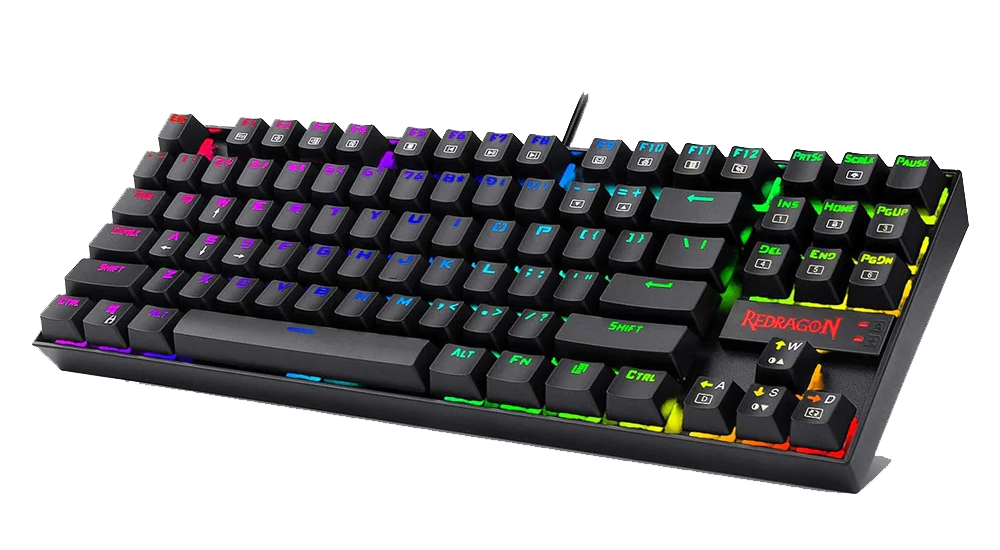
Best for: Gamers who want a familiar 87-key layout with dedicated navigation controls.
The Redragon Kumara K552 is another tenkeyless mechanical keyboard, but its construction and styling differ from the compact K617 Fizz.
Redragon’s Indian store lists K552 variants with red or blue switches. The manufacturer describes a metal-and-ABS construction, RGB or rainbow backlighting depending on the version, anti-ghosting across all 87 keys, and multimedia functions. The red-switch version was listed around ₹2,290 during research. Redragon India
Key specifications
| Feature | Specification |
|---|---|
| Layout | Tenkeyless |
| Number of keys | 87 |
| Switch options | Red or blue, depending on variant |
| Connectivity | Wired USB |
| Construction | Metal and ABS |
| Lighting | RGB or rainbow, depending on variant |
| Key rollover | Full-key anti-ghosting |
| Indicative price | Around ₹2,290 for a listed red-switch version |
Source: Redragon India K552 listing and Redragon keyboard collection.
Why consider the K552?
The familiar layout is its biggest advantage.
You keep the arrow keys, function row, and navigation cluster without the extra width of a number pad. That makes it suitable for gaming as well as typing, coding, and general computer use.
Its construction and anti-ghosting support are also useful features for a keyboard intended for gaming.
If you often press several keys simultaneously, anti-ghosting and key rollover help ensure the keyboard registers the intended combinations.
Red switches or blue switches?
Choose based on how you use your keyboard.
- Red switches: A linear feel without a pronounced tactile bump. Worth considering for gaming and quieter shared spaces, although they still produce keypress noise.
- Blue switches: A distinct tactile and audible click. They can be enjoyable for typing but may be too loud for a shared room or microphone-heavy livestreams.
The precise feel and sound depend on the switch version, keycaps, stabilisers, and keyboard construction.
What should you know before buying?
Check whether the listing is for the RGB or rainbow version. Similar-looking product pages can refer to different variants.
Also verify the switch type, warranty, and included accessories. Redragon’s store includes both new and open-box or refurbished products, so make sure you’re ordering the condition you intend to buy. Redragon India
Our verdict: Consider the K552 if you want a straightforward TKL keyboard and prefer the feel of a more traditional gaming board.
Call to action: Check the current price of the Redragon Kumara K552. Insert your affiliate link here.
4. Kreo Hive 65 — Best for Compact Customisation
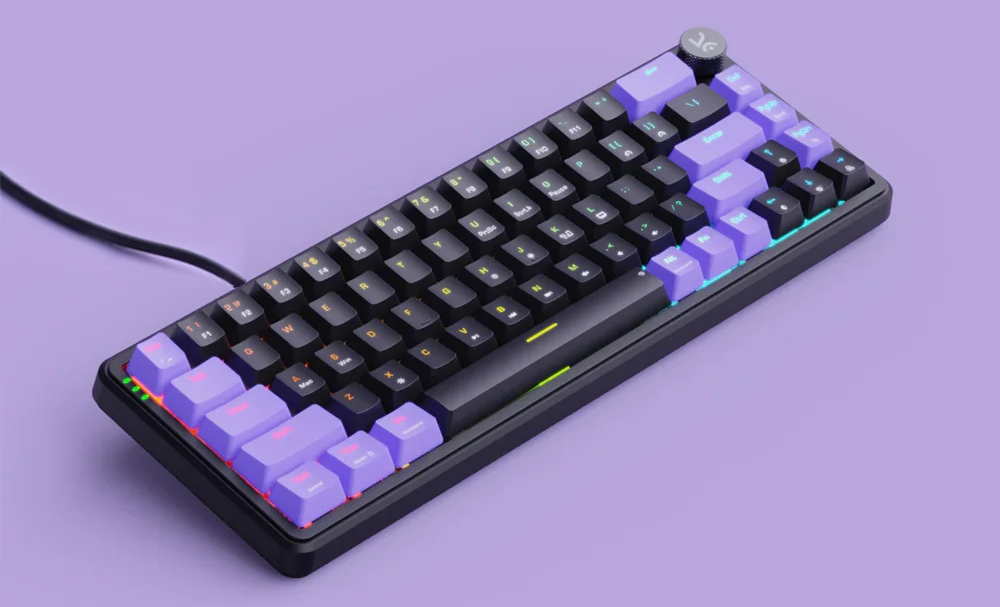
Best for: Buyers who want a compact keyboard with hot-swap support and additional customisation options.
The Kreo Hive 65 is worth comparing if you want something between an ultra-compact 60% board and a larger TKL keyboard.
Kreo’s product comparison lists the Hive 65 with a 64-key layout, hot-swappable 3-pin and 5-pin switch support, a detachable USB-C cable, full RGB lighting, and software support for customisation. The manufacturer also lists a gasket-style mounting design and foam damping. Kreo
Key specifications
| Feature | Specification |
|---|---|
| Layout | 65% |
| Number of keys | 64 |
| Switch type | Linear switches, depending on version |
| Connectivity | Wired USB-C |
| Hot-swappable | Yes; 3-pin and 5-pin support listed |
| Lighting | RGB |
| Mounting | Gasket-style design |
| Software | Key customisation and macros |
| Indicative price | Approximately ₹2,299–₹2,499; verify current listing |
Source: Kreo HIVE keyboard comparison and Kreo HIVE 98 V2 comparison page.
Why consider the Hive 65?
The 65% layout keeps the footprint small while retaining dedicated arrow keys.
That makes it more practical than a 60% keyboard if you regularly navigate documents, browse spreadsheets, or use keyboard shortcuts.
Its hot-swap support is another attraction. You can experiment with compatible switches or replace individual switches without soldering.
Kreo also advertises software customisation, allowing users to change supported key functions and macros.
The gasket-style mounting and foam damping are design features intended to influence the keyboard’s typing feel and sound. However, these features alone don’t guarantee that it will sound better than every competing keyboard.
What are the compromises?
The Hive 65’s compact layout still requires some adjustment if you’re used to a full-size keyboard.
Its listed price also varies between comparison pages. Check the exact model and current price before ordering rather than assuming every version falls below ₹2,500.
Our verdict: A good option to compare if you want compact dimensions, dedicated arrow keys, and switch customisation.
Call to action: Check the latest price of the Kreo Hive 65. Insert your affiliate link here.
Which Mechanical Keyboard Should You Buy?
The right choice depends on your desk, games, typing habits, and preferred switch feel.
| Your priority | Keyboard to consider | Why |
|---|---|---|
| Maximum mouse space | Redragon K617 Fizz | 60% compact layout |
| Affordable TKL gaming | Cosmic Byte Pandora TKL | 87 keys and dedicated arrow keys |
| Familiar gaming layout | Redragon Kumara K552 | TKL layout and traditional design |
| Compact layout with hot-swap support | Kreo Hive 65 | 65% layout, arrow keys, customisation |
These are recommendations based on published specifications and intended use cases, not controlled head-to-head tests.
Mechanical Keyboard Buying Guide: What Actually Matters?
Before choosing a keyboard, understand these five factors.
1. Red vs blue switches: Which is better?
The switch type influences how a key feels and sounds.
| Switch type | Feel | Sound | Best suited for |
|---|---|---|---|
| Red (linear) | Smooth press without a tactile bump | Usually less clicky | Gaming and general use |
| Blue (clicky) | Noticeable tactile feedback and click | Relatively loud | Typing enthusiasts who enjoy audible feedback |
| Brown (tactile) | Tactile bump without the same deliberate click | Usually less clicky than blue | Mixed typing and gaming |
These are general characteristics; the exact sound and force vary by switch model.
For competitive gaming, linear switches are a reasonable starting point because their movement is consistent. For typing, the choice is personal—some people prefer a tactile bump, while others prefer a smooth press.
Buying tip: If you share a room or use a microphone for livestreaming, consider how much keyboard noise your switch choice will produce.
2. 60%, 65%, TKL, or full-size: Which layout is best?
The layout determines which keys are available without using a function layer.
| Layout | Typical characteristics | Best for |
|---|---|---|
| 60% | Very compact, usually around 61 keys | FPS gaming and small desks |
| 65% | Compact with dedicated arrow keys | Gaming and everyday use |
| TKL | Usually 87 keys, without the number pad | Gaming, typing, and productivity |
| Full-size | Includes a number pad | Data entry, spreadsheets, and users who need every key |
A smaller keyboard gives your mouse more room, but it can make some everyday shortcuts less convenient.
If you regularly use arrow keys or function keys, a 65% or TKL keyboard may be a better compromise than a 60% model.
3. What is hot-swappable?
A hot-swappable keyboard lets you remove compatible switches and install replacements without soldering.
This is useful if a switch develops a fault or you want to experiment with different switch types.
However, hot-swappable doesn’t mean every mechanical switch is compatible. Check the socket type, pin configuration, and the keyboard manufacturer’s guidance before buying replacements.
If you’re unlikely to modify your keyboard, hot-swap support may be less important than layout, typing feel, and warranty.
4. Is RGB lighting important for gaming?
RGB lighting is mostly an aesthetic feature.
It can make your desk look attractive and improve key visibility in some lighting conditions, but it doesn’t automatically improve your reaction time or gaming performance.
Prioritise switch feel, layout, and build quality first. Treat RGB as a bonus rather than the primary reason to choose a keyboard.
5. Should you buy a wired or wireless keyboard?
All four keyboards in this guide are wired options.
A wired keyboard is straightforward to set up and doesn’t require battery charging. Wireless keyboards can offer a cleaner desk and greater flexibility, but they may cost more and introduce battery-management considerations.
For a desktop gaming setup, a good wired keyboard is still a sensible choice at this budget.
6. What is anti-ghosting, and why does it matter?
Anti-ghosting helps a keyboard correctly register multiple simultaneous keypresses.
This matters in games where you might hold movement keys while jumping, sprinting, and activating another control.
Key rollover describes how many simultaneous keypresses the keyboard can register. Full N-key rollover means the keyboard can register all keys simultaneously under its supported operating conditions.
For gaming, it’s worth checking these specifications rather than assuming every keyboard with RGB lighting offers the same input behaviour.
7. Can you use these keyboards with a Mac or console?
Compatibility depends on the keyboard and the platform.
A basic wired USB keyboard may work for ordinary input on a compatible device, but software features, macros, RGB customisation, and some key combinations may not work identically across Windows, macOS, PlayStation, and Xbox.
Check the manufacturer’s compatibility information before purchasing, especially if you plan to use the keyboard with a console.
How to Set Up Your New Mechanical Keyboard
Once your keyboard arrives, a few simple steps will help you get started.
- Connect it directly to your PC. Use the supplied cable and a compatible USB port.
- Test every key. Open a text editor and check the letter keys, arrow keys, function keys, and modifier keys.
- Set your preferred lighting. Use onboard controls or the manufacturer’s software where supported.
- Adjust your typing angle. Use the keyboard’s feet if available, and position it comfortably on your desk.
- Test your gaming key combinations. Check that movement, sprinting, jumping, and other frequently used inputs register correctly.
- Save the packaging and warranty details. These may be useful if you need support or a replacement.
If a key doesn’t register consistently, test the keyboard on another compatible USB port before assuming the keyboard is faulty.
Frequently Asked Questions
Which is the best mechanical keyboard under ₹3,000 in India?
The Redragon K617 Fizz is worth considering for compact FPS gaming, while the Cosmic Byte Pandora TKL is a strong budget choice for users who want dedicated arrow keys. The Redragon Kumara K552 and Kreo Hive 65 are alternatives depending on layout and customisation preferences.
Is the Redragon K617 Fizz good for Valorant?
Its compact 60% layout can be useful for Valorant because it leaves more desk space for mouse movement. Whether it improves your performance depends on your preferred layout, sensitivity, and familiarity with the keyboard.
Is a 60% keyboard better than a TKL keyboard?
Neither is universally better. A 60% keyboard occupies less desk space, while a TKL keyboard retains dedicated arrow keys and a function row. Choose based on the keys you use most often.
Are red switches quieter than blue switches?
Red switches generally lack the deliberate audible click associated with blue switches. However, all mechanical switches produce some sound, and the overall noise depends on the switch, keycaps, stabilisers, keyboard construction, and typing style.
Is hot-swap support worth it under ₹3,000?
It can be useful if you want to customise your keyboard or replace a compatible switch without soldering. If you prefer a plug-and-play keyboard and don’t plan to modify it, other features may matter more.
Can I use a mechanical keyboard for office work?
Yes. Mechanical keyboards can be used for gaming, coding, writing, and general productivity. The best choice depends on your layout preference, typing comfort, and tolerance for keyboard noise.
Do mechanical keyboards improve gaming performance?
They can provide a typing and input experience that some gamers prefer, but buying one doesn’t automatically make you better at a game. Practice, settings, reaction time, and familiarity with your controls remain important.
Should I buy a full-size keyboard for gaming?
A full-size keyboard is useful if you need a number pad for work or data entry. If you mainly play games and want more room for your mouse, a TKL or compact layout may suit you better.
Final Verdict: Which Mechanical Keyboard Is Worth Buying?
You don’t need to spend your entire ₹3,000 budget to get a capable gaming keyboard.
Here’s our final recommendation:
- For compact FPS gaming: Redragon K617 Fizz.
- For affordable all-round gaming: Cosmic Byte Pandora TKL.
- For a familiar tenkeyless layout: Redragon Kumara K552.
- For compact customisation: Kreo Hive 65.
If you mainly play competitive shooters, start by comparing the K617 Fizz and Hive 65. If you type frequently or want dedicated arrow keys, the Pandora TKL and Kumara K552 are more natural options.
Our advice: Choose your layout first, then your switch type, and only then compare RGB effects and other extras. Verify the exact variant, price, warranty, and seller before ordering.
A keyboard should fit your hands, habits, and desk—not just look good in a gaming setup photo